To weigh an ingredient without counting the bowl, place the empty bowl on the kitchen scale, wait for the reading to settle, and press its tare or zero button. Confirm the display reads zero in the unit your recipe requires before adding the ingredient.
Tare changes the displayed starting point; it does not make a heavy bowl weightless or increase the scale’s physical capacity. Button behavior, minimum measurable quantities and automatic shutoff vary by model. Use your own scale’s instructions rather than assuming every digital scale works identically.
A small-batch example you can check
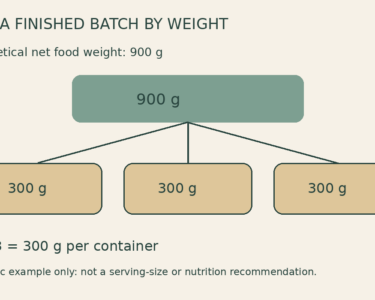
Hypothetical measurement exercise: You need to portion 180 g of dry oats into three equal containers. That is 180 ÷ 3 = 60 g per container. This is a weighing example, not a tested recipe or a nutritional serving recommendation.
Place the first empty container on the scale, tare it, and add oats until the display reads 60 g. Remove that container. Put the next empty container on the platform and establish its own zero before weighing another 60 g. Repeat for the third. The containers may weigh different amounts, so the first container’s weight is not a reliable substitute for taring each one.
When adding several ingredients to one bowl
Where your model supports add-and-weigh operation, you can tare again between ingredients. OXO’s published instructions describe zeroing before continuing to add ingredients, subject to the scale’s maximum capacity. Check that your next addition is intended to go into the same bowl before pressing zero.
Hypothetical arithmetic: A bowl already contains a correctly measured 120 g of ingredient A. The next target is 35 g of ingredient B. If you tare between additions, stop at 35 g for B. If you deliberately keep a running total instead, the target becomes 155 g. Do not switch between these methods halfway through without recording what the display represents.
For a mixture you cannot easily separate, consider weighing an uncertain or easily over-poured ingredient in a separate container first. That gives you a chance to correct the quantity before combining it with everything else.
Check the unit before trusting the number
The digits alone are not the measurement. Read the unit indicator: grams, ounces and pounds are different. If your recipe specifies grams, select grams before the first addition and recheck after any power cycle or mode change.
A scale reading in grams is also not automatically a volume measurement. See grams versus milliliters before converting a recipe that specifies a liquid volume.
What to do when the display turns off
Pause before adding anything else. If you know the empty container’s mass and every addition, you may be able to reconstruct a total mathematically, but first check the device’s restart behavior. Do not assume it remembers the last tare.
If an ingredient is still separate, re-establish a reliable measurement using the instructions for that scale. If ingredients are already mixed and the amounts are unknown, zeroing the mixture only establishes a new starting point; it cannot reveal what you added earlier.
Tare is different from checking accuracy
A zero display means the current starting point has been offset. It does not by itself demonstrate that the instrument measures an added mass correctly. If readings drift or repeat inconsistently, consult the manufacturer’s troubleshooting and calibration guidance for the exact model.
Record what you observe: model, unit, container, ingredient, whether you tared, and what changed. For example: “Container removed and replaced; display no longer returns to the same reading.” That is more useful than guessing a correction factor and applying it to every recipe.
A short pre-measurement check
Confirm the intended ingredient and target quantity. Confirm the displayed unit. Place the container as directed by the manufacturer. Establish zero, add the ingredient, and record completion before moving to the next ingredient. Stay within the device’s rated load and measurement limits.
Manufacturer references checked October 19, 2026: OXO add-and-weigh instructions and OXO scale button and capacity instructions. These references explain particular OXO models; the examples above do not constitute a product test or endorsement.
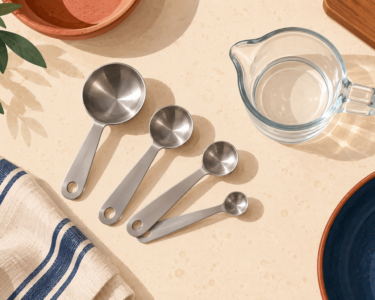
Illustrative photo: User_Pascal on Unsplash, used under the Unsplash License. The photographed scale is not identified as an OXO model.
Once the scale’s zero is established, use finished-batch portioning arithmetic to divide a measured amount into containers and reconcile what was actually packed.