Skip to content
Home
Blog
Fitness
Lifestyle
Auto Warranty
All Guides
Browse All Articles
Health & Fitness
Lifestyle
Food
Home & Living
Sports
Pets
Cars
Technology & Security
Investing
Politics
General
Contact
x
Home
Blog
Fitness
Lifestyle
Auto Warranty
All Guides
Browse All Articles
Health & Fitness
Lifestyle
Food
Home & Living
Sports
Pets
Cars
Technology & Security
Investing
Politics
General
Contact
Home
Blog
Fitness
Lifestyle
Auto Warranty
All Guides
Browse All Articles
Health & Fitness
Lifestyle
Food
Home & Living
Sports
Pets
Cars
Technology & Security
Investing
Politics
General
Contact
IT & Security
Home
-
IT & Security
IT & Security
October 18, 2026
(0) Comment
Phone Storage Full? Check Downloads Before Deleting Photos
Phone Storage Full? Check Downloads Before Deleting Photos. The practical approach is to verify the relevant instructions, take one manageable…
IT & Security
October 18, 2026
(0) Comment
Google Chrome Site Notifications: Stop Alerts Without Blocking Everything
Google Chrome Site Notifications: Stop Alerts Without Blocking Everything A practical checklist can prevent avoidable mistakes. Use the steps below,…
IT & Security
October 18, 2026
(0) Comment
Before You Share a Google Drive Link: A Five-Point Permission Check
Before You Share a Google Drive Link: A Five-Point Permission Check A practical checklist can prevent avoidable mistakes. Use the…
IT & Security
October 18, 2026
(0) Comment
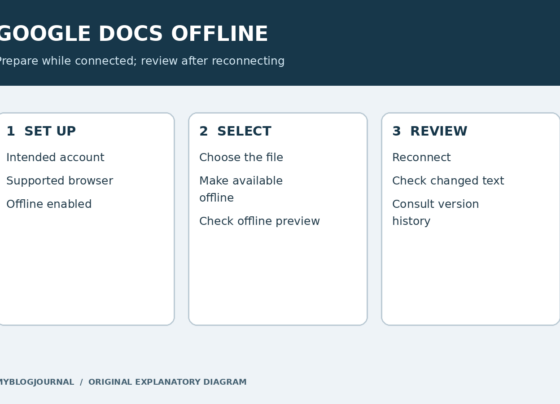
Google Docs Offline: Prepare and Check a File Before You Lose Wi-Fi
Prepare Google Docs offline access while you still have an internet connection. For Drive on the web, Google requires Chrome…
IT & Security
October 18, 2026
(0) Comment
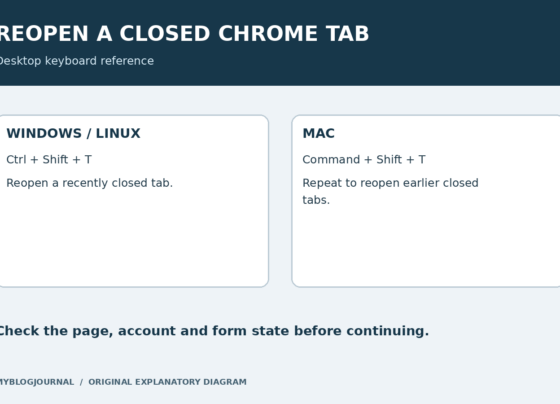
Reopen a Closed Chrome Tab: Use the Right Shortcut for Your Computer
To reopen a recently closed tab in desktop Chrome, press Ctrl + Shift + T on Windows or Linux, or…
IT & Security
October 18, 2026
(0) Comment
Gmail Archive vs. Delete: Choose What You Want to Happen
Archive a Gmail message when you want it out of the inbox but still retained. Delete it when you intend…
IT & Security
October 18, 2026
(0) Comment
Google Docs Version History: Recover Text Without Replacing Newer Work
If text disappears from a Google Doc, inspect version history before rebuilding it from memory. You may be able to…
IT & Security
October 18, 2026
(0) Comment
Gmail Scheduled Email: Edit It Without Accidentally Sending It Now
To edit a scheduled email in desktop Gmail, open Scheduled, select the message, and choose Cancel send. Gmail returns it…
IT & Security
October 18, 2026
(0) Comment
Chrome Download Location: Choose a Folder or Ask Every Time
On desktop Chrome, open the three-dot menu, choose Settings, then Downloads. Change the default location for future downloads, or enable…
IT & Security
October 17, 2026
(0) Comment
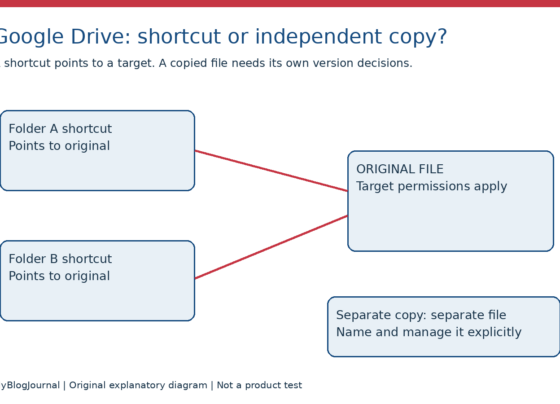
Google Drive Shortcut or Copy? Keep the Intended Original
Use a shortcut when you want another route to the same original. Make a copy when you deliberately need a…
1
...
4
5
6
7
8